
BLOG • WEB DESIGN
Website Redesign SEO Checklist: Redesign Without Losing Rankings
A fresh design can lift sales and trust. It can also erase years of search rankings. Both outcomes start from the same project. The planning before launch decides which one happens.

Most redesign traffic losses have boring causes. URLs change without proper redirects in place. Ranking pages get deleted during cleanup. A staging block stays live after launch. Each mistake is fully preventable with preparation.
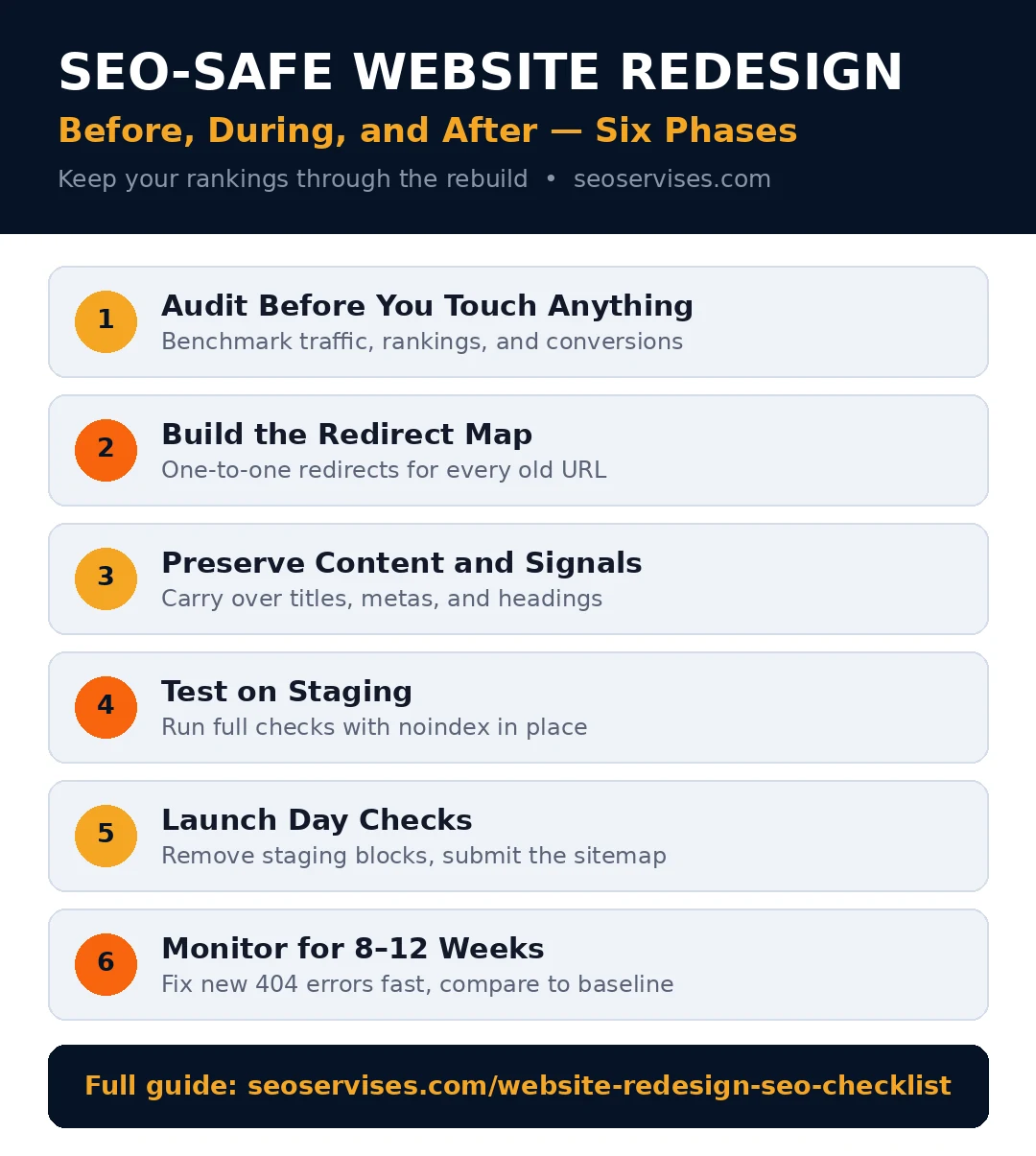
This website redesign seo checklist follows the safe order. Audit first, then build your redirect map. Preserve content, test staging, and monitor launch. It mirrors the process behind our website redesign services.
Quick answer: Keep every URL that earns traffic or links. Map one-to-one 301 redirects for changed URLs. Carry over titles, content, and schema carefully. Test everything on a blocked staging site. Then watch Search Console daily after launch.
The checklist by phase:
- Before: benchmark, crawl, and inventory every URL
- Before: build the full redirect map
- During: preserve content, titles, and internal links
- During: test speed, schema, and staging settings
- At launch: remove blocks and submit the sitemap
- After: monitor errors, rankings, and traffic for weeks
Table 1: The Redesign Checklist by Phase
| Phase | Must-do tasks | Owner |
|---|---|---|
| Before launch | Benchmark traffic, rankings, and conversions | SEO lead |
| Before launch | Crawl and export every live URL | SEO lead |
| Before launch | Build a one-to-one redirect map | SEO plus developer |
| During build | Carry over titles, metas, and headings | SEO plus writer |
| During build | Test staging with noindex in place | Developer |
| At launch | Remove staging blocks from live site | Developer |
| At launch | Submit the new XML sitemap | SEO lead |
| After launch | Fix new 404 errors the same day | SEO plus developer |
| After launch | Compare results against the baseline | SEO lead |
Phase 1: Audit Before You Touch Anything
You cannot protect what you never measured. Record your baseline before design work starts. That baseline proves what changed after launch.
Export your top pages from your analytics tool. Note traffic, conversions, and revenue per page. Export rankings for your main keywords too. Save everything in one shared folder.
Crawl your whole site with a free crawler. Save every URL, title, and heading found. This crawl becomes your redesign source of truth. Compare the new site against it later.
List every page with backlinks pointing to it. Pages with links carry value beyond traffic. Deleting them wastes authority you already earned. Flag them as keep or redirect carefully.
Run a full check with our technical SEO audit checklist before building. It surfaces crawl and indexing issues early. Fixing them pre-launch is far cheaper.
Does a website redesign hurt SEO?
It can, but the damage is usually preventable. A redesign changes URLs, content, and code together. Mishandling any one of those costs rankings. A short dip in early weeks is normal. Google needs time to recrawl the new site. Lasting losses come from broken redirects or deleted content. Both failures are planning failures, not design failures.
Phase 2: Build the Redirect Map
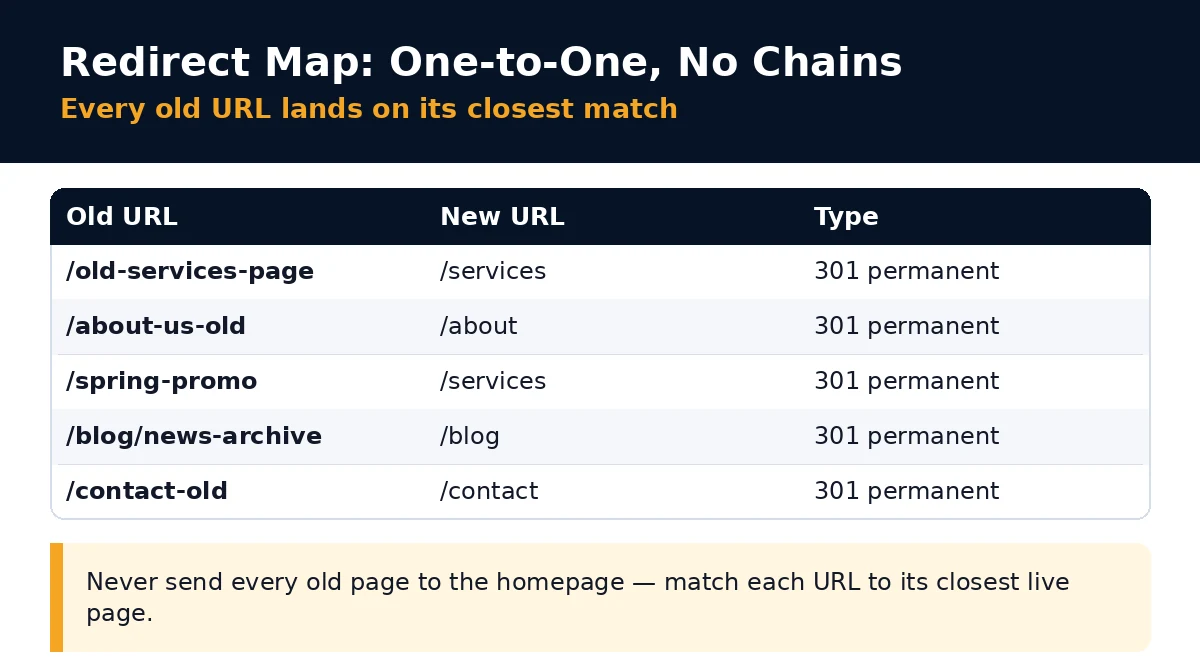
The redirect map is your most important document. It pairs every old URL with its new home. Build it before developers change any URLs. Test it before the launch day arrives.
Keep URLs unchanged wherever you possibly can. An unchanged URL needs no redirect at all. It keeps its rankings, links, and history intact. Change a URL only for a clear reason.
Use 301 redirects for permanent URL changes. A 301 passes most link value forward. Send each old page to its closest match. Topic match matters more than convenience here.
Never redirect many pages to the homepage. Google treats those redirects like soft 404s. The lost pages pass almost no value. Users also land somewhere irrelevant and leave.
Should I redirect old pages to the homepage?
No, that shortcut wastes the old page value. Google reads mass homepage redirects as soft errors. The ranking power of those pages fades fast. Send each page to its closest topical match. If no match exists, let it return 404. An honest 404 beats a misleading redirect.
Phase 3: Preserve Content and On-Page Signals
Designers often trim text to clean up layouts. That trimming can delete your ranking content. Search engines rank the words on the page. Removing them removes your proof of relevance.
Keep key paragraphs on your top pages. You can reformat, reorder, and polish them. Do not cut the core service details. Do not drop location and proof points.
Carry over every title tag and meta description. Move H1 and heading structure across too. Keep image alt text and file names. These small fields hold real ranking signals.
Protect your internal link structure as well. Note which pages link to your money pages. Rebuild those links in the new layout. Orphaned pages lose visibility very quickly.
Keep your structured data in the move. Google explains structured data basics in its Search Central guide. Re-add and validate it on staging. Missing schema means lost rich results.
What is the most common redesign SEO mistake?
Two mistakes tie for first place here. Launching without a complete redirect map is one. Leaving the staging robots block live is another. The second can deindex your entire site. Both failures appear in post launch audits often. A pre-launch crawl catches each one cheaply. That crawl is the cheapest insurance in redesign work.
Phase 4: Test on Staging Before Launch
Your staging site should hide from Google fully. Use noindex tags or password protection there. Never let staging pages enter the index. Duplicate live and staging pages confuse Google.
Crawl the staging site like a live site. Compare its URL list against your baseline. Find missing pages, changed titles, and broken links. Fix gaps while changes stay cheap.
Test speed on staging with real page templates. A heavy new design can tank load times. Check mobile layouts first, since most traffic is mobile. Our speed targets still apply after redesign.
Check forms, calls, and checkout flows too. A redesign that protects rankings but breaks forms fails. Test every conversion path on real devices. Rankings exist to drive those actions.
Should SEO start before or after a redesign?
SEO should start before the redesign begins. The cheapest protection happens during planning stages. URLs, content, and structure are moving anyway then. Early input shapes those choices correctly. Bringing SEO in after launch means damage control. That work costs more and recovers less. Book the audit before design approval, not after.

Phase 5: Launch Day Checks
Launch day needs a short written checklist. Work it in order, with no skipped steps. Most launch disasters come from one missed item.
Remove every staging block from the live site. Check robots.txt and noindex tags first. Confirm Google can crawl your key pages. One leftover line can hide the whole site.
Submit your new XML sitemap in Search Console. Google documents the process in its sitemap guide. Request indexing for your top money pages. Then verify analytics and call tracking still fire.
Click through your redirect map samples manually. Test old URLs from search results and emails. Confirm each lands on the right new page. Fix any chains or loops you find.
Keep one person on call for launch fixes. Errors found in hour one stay small. Errors found in week two cost real traffic. A named owner with developer access solves both. Put that name on the checklist itself.
Phase 6: Monitor for Eight to Twelve Weeks
Check Search Console daily for two weeks. Watch coverage errors and new 404 reports. Fix new errors the same day they appear. Speed matters more now than ever.
Compare traffic against your saved baseline weekly. Small dips in week one are normal. A sharp drop on one page signals trouble. Look for a missing redirect or lost content.
Update links you control to the new URLs. Change links on social profiles and directories. Ask key partners to update their links too. Direct links beat redirected links every time.
Table 2: Post-Launch Monitoring Signals
| Signal | Where to check | Act when |
|---|---|---|
| New 404 errors | Search Console coverage report | The same day they appear |
| Indexing drops | Search Console pages report | Key pages fall out of index |
| Traffic versus baseline | Analytics weekly comparison | One page drops sharply alone |
| Redirect chains | Crawler re-check monthly | Any chain exceeds two hops |
| Speed scores | PageSpeed Insights monthly | Scores fall below your baseline |
How long do rankings take to recover after a redesign?
A clean redesign usually settles within a few weeks. Rankings may wobble while Google recrawls everything. Most sites return to baseline within two months. Investigate if key pages lag after eight weeks. Check redirects, indexing, and lost content first. Waiting longer rarely fixes a technical cause.
When a Platform Move Joins the Redesign
Changing platforms raises the risk level sharply. A WordPress move adds its own checks. Follow our WordPress migration SEO checklist alongside this one. It covers permalinks, plugins, and media moves. Two checklists beat one overloaded list.
Only switch CMS when your current one limits real growth. Slow publishing and rigid templates are valid reasons. Poor speed with no fix path also counts. A CMS swap adds migration risk and cost. Do not change platforms just for novelty. Decide from limits, not from launch excitement.
Score Your Redesign Readiness
Give yourself one point for each finished item below. Be honest, because gaps found now cost little. Gaps found after launch cost traffic and time.
- Baseline traffic and rankings saved in a folder
- Full crawl exported with every live URL listed
- Redirect map built for every changing URL
- Titles, metas, and headings ready to carry over
- Top page content marked as keep, not cut
- Staging site blocked with noindex or a password
- Launch day checklist assigned to named owners
- Sitemap and analytics checks planned for launch
- Eight week monitoring rhythm booked in advance
Scoring guide: Eight or nine points means launch ready. Five to seven means finish the gaps first. Under five means pause and complete Phase 1.
Ready to Redesign Without the Ranking Scare?
A careful plan protects the traffic you earned. The steps above cover the full journey. Baseline, redirects, content, testing, and monitoring matter equally.
Want an SEO lead inside your redesign project? Contact us before design work starts, not after launch.
Frequently Asked Questions
How do you redesign a website without losing SEO?
Start with a full audit and saved baseline. Keep ranking URLs or map 301 redirects. Preserve content, titles, and internal links carefully. Test staging, then remove blocks at launch. Monitor Search Console closely for several weeks.
What should be included in a website redesign checklist?
Include an SEO audit and content inventory first. Add URL mapping and a redirect plan. Cover performance, schema, and analytics checks. Add pre-launch QA on a staging site. Finish with post launch monitoring tasks.
How much traffic can you lose after a redesign?
A planned redesign usually dips briefly, then recovers. Traffic often returns to baseline within weeks. A careless redesign can lose a large share. Missing redirects and deleted pages cause that damage. Recovery then takes months of repair work.
How long does a website redesign usually take?
Most small business redesigns take four to twelve weeks. Scope and page count drive the timeline. Content delays slow projects more than design does. Platform changes add extra testing time. Plan the SEO steps into that schedule early.
Will a redesign help my rankings improve?
Yes, a redesign can improve rankings over time. Faster pages and clearer structure help Google. Better mobile layouts help visitors convert more. Those gains need your old signals preserved first. Protect value, then build on it.