
BLOG • LOCAL SEO
Why Is My Business Not Showing Up on Google Maps? 9 Fixes
You search your own business and find rivals instead. Your shop exists, your customers exist, but Maps hides you. That gap costs calls every single day. Most causes are ordinary and fixable at home.

This guide diagnoses the problem before prescribing fixes. First, learn which type of invisibility you face. Then work through nine fixes in order. Our local ranking services for small firms handle these cases weekly.
Quick answer: A business not showing on google maps usually lacks verification. Suspension, duplicates, wrong categories, and weak reviews also hide listings. Check your dashboard status before changing anything. Fix one cause at a time, then wait.
Start with this two-minute test:
- Search your exact business name in Maps
- Search your main service plus your city
- Search again from a few miles away
- Note which searches show your listing
Table 1: Diagnose Your Problem First
Your search pattern points to the likely cause. Match your result below before you edit anything.
| What you see | Likely cause | Go to |
|---|---|---|
| Nothing, even by name | Unverified or suspended | Fix 1 and 2 |
| An unfamiliar listing appears | Unclaimed or duplicate | Fix 3 |
| Found by name only | Weak relevance signals | Fix 4 to 6 |
| Found nearby, gone farther out | Distance and competition | Fix 7 to 9 |
| Listing vanished recently | Edit review or suspension | Fix 2 |
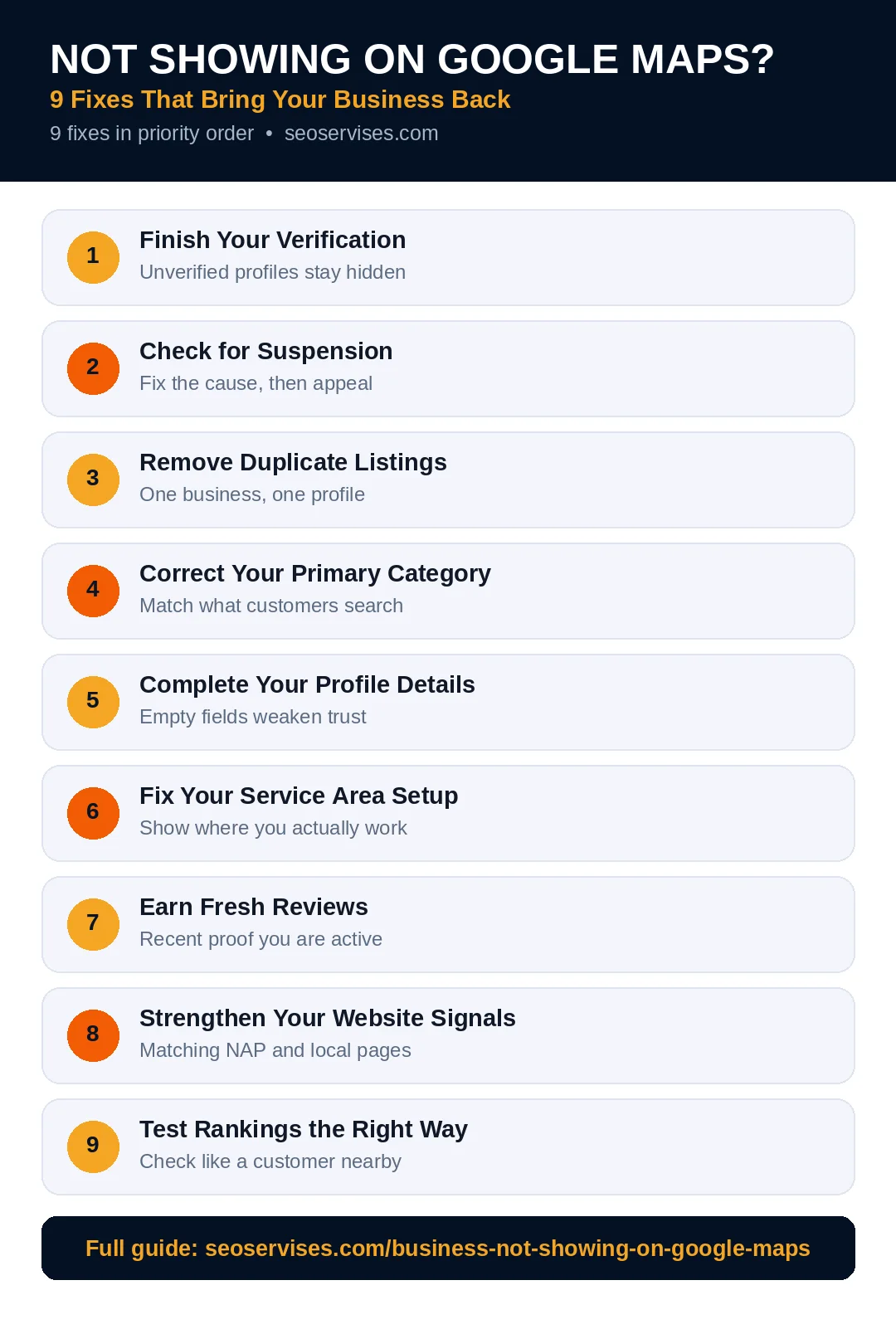
Fix 1: Finish Your Verification
Google will not reliably show unverified businesses. An unverified profile can exist yet stay invisible. Owners often assume verification finished months ago. Check the dashboard status, not your memory.
Look for a “Get verified” prompt today. Complete the method Google assigns to you. Video verification is common for trades now. Show signage, tools, stock, and proof of access. Record one unbroken clip without pauses.
Postcard codes usually arrive within fourteen days. Phone and email reviews finish much faster. Verification review can take five business days. Your listing may appear shortly after approval.
Never start a second profile while waiting. Duplicates create a second problem to fix. Wait, verify, and then optimize the original.
How long until my business appears on Google Maps?
Verification review takes up to five business days. New profiles may need two more weeks. Google says rankings can take a month overall. Edits often appear within three days. Patience beats repeated profile changes here.
Fix 2: Check for Suspension
A suspended profile disappears from Maps and Search. Google does not always announce suspensions loudly. Sign in and look for a warning banner. Nothing else matters until suspension ends.
Common triggers include stuffed business names. Fake, borrowed, or virtual office addresses trigger them too. Ineligible categories and bulk edits also cause flags. A rival may even report your listing.
Fix the rule break before you appeal. Restore your real name and real address. Gather licenses, tax papers, and utility bills. Add storefront photos showing permanent signage.
File the reinstatement appeal inside your dashboard. Then wait without editing the profile. Editing during appeal can restart the review. Never create a replacement profile during appeal either. Google explains reinstatement steps in its Business Profile Help guide.
What should I do if my profile is suspended?
Stop editing and find the rule break first. Fix your name, address, or category data. Gather documents that prove your real business. File one appeal with that proof attached. Then wait for Google without further changes.
Fix 3: Remove Duplicate Listings
Duplicates split reviews, photos, and trust signals. Google often shows one listing and suppresses another. Moves and rebrands leave duplicates behind often. A former owner can leave one too.
Search your name on Maps in four ways. Try your old name and old address. Try your phone number as a search. Open every listing that looks like yours. Note which one holds your real reviews.
Claim any listing that belongs to you. Then request a merge or removal through Google. Never delete a listing blindly yourself. Deleting the wrong one can lose reviews forever. Merging keeps the history in most cases.
Check major directories for duplicates too. Old Yelp and Facebook pages confuse customers. They also weaken your citation consistency overall. Clean the big platforms before small directories.

Fix 4: Correct Your Primary Category
Category errors quietly kill your service visibility. You may rank for your name only. That pattern signals a relevance problem, not removal. Your category tells Google what you do.
Pick the most specific primary category available. “Plumber” outperforms “Contractor” for plumbing searches. Add secondary categories for real extra services only. Each one should match a listed service.
Study the top three map rivals closely. Their categories reveal what Google rewards locally. Match the winning pattern when it fits honestly. Do not copy categories for services you lack.
Allow a week after any category change. Google may review the edit before publishing. Rankings can wobble during that review window. Judge the result after ten full days.
Why do I show for my name but not my service?
Your profile exists, but relevance signals are weak. Google trusts your brand name match only. Your category, services, or website content need work. Rivals likely carry stronger signals in each area. Fix categories first, then services and pages.
Fix 5: Complete Your Profile Details
Half-finished profiles rank below complete rivals. Missing hours, services, and photos all hurt. Google matches searches against these fields daily. Empty fields mean missed matching chances.
Fill every field the dashboard offers you. Add services with short, clear descriptions. Set holiday hours before each public holiday. Add attributes that describe access and ownership. Link your website and booking pages correctly.
Use the setup order in our full profile optimization walkthrough for this step. It covers each field with exact settings. Work through it in one focused session.
Keep details identical across the web too. Your website footer must match your profile. Directory listings must match both records exactly. Mixed data lowers Google trust in your listing.
Fix 6: Fix Your Service Area Setup
Service-area setup errors hide many mobile businesses. Plumbers, cleaners, and lawn care firms face this most. Hiding your address is correct for you. Empty or wrong service areas are not.
Open your location settings in the dashboard. List cities or zip codes you truly serve. Google allows up to twenty service areas. Keep them within a realistic driving distance.
Never list a post office box address. Never use a virtual office as your base. Google requires a real, staffed business location. Your home address can stay hidden from shoppers.
Storefronts should never hide their address. Hiding it removes your map pin entirely. That choice confuses Google about your type. Match the setting to how customers reach you.

Fix 7: Earn Fresh Reviews
Weak review profiles lose the prominence contest. Rivals with fresher reviews outrank older listings. Google counts count, rating, and recency together. A stale profile fades even without errors.
Ask every recent customer for a review. Send your direct review link after each job. Reply to every review within two days. Thank happy customers and address complaints calmly.
Never buy reviews or offer rewards. Google removes fake reviews in bulk purges. The FTC also fines fake review schemes. Honest volume grows slower but stays safe.
Compare your count with three close rivals. Set a monthly target that closes the gap. Ten fresh reviews often shift local visibility. Track the count in a simple monthly sheet.
Fix 8: Strengthen Your Website Signals
Your website supports or undermines your map listing. Google reads your site to confirm profile claims. A thin site gives Google little to trust. Wrong details actively hurt your local case.
Put your full address on the contact page. Embed a map of your real location. Match the phone number to your profile. Create one clear page per core service. Add LocalBusiness schema with matching details. Google documents that format in Search Central.
Fix mobile speed and broken contact forms. Most local searches happen on phones today. A broken call button wastes hard-won visibility. Test every form and tap target monthly.
Use the broader small business local checklist to audit these signals. It orders website, citation, and review work together. That order prevents gaps between your channels.
Can a website problem hide my Maps listing?
A weak website rarely hides a listing alone. It usually lowers rankings alongside other gaps. Wrong address data on your site hurts more. Google cross-checks your site against your profile. Keep both records identical and current.
Fix 9: Test Rankings the Right Way
Many owners test rankings in misleading ways. Your phone personalizes results around your history. Searching from home shows a flattering picture. That picture differs from real customer results.
Test in an incognito browser window instead. Set the search location to your shop address. Try your name, then your main service. Repeat from a point miles away. Distance alone may explain the second result.
Map results change by street and hour. A business can rank first on one block. It can vanish three miles farther out. That pattern reflects distance, not a penalty. Grid tools show this pattern most clearly.
Give fixes time before judging them. Verification and category changes need days. Review gains need weeks of steady work. Judge progress monthly using calls, not screenshots.
Table 2: Fix Timeline at a Glance
Most owners can finish diagnosis in one afternoon. Ranking gains then build across the next month.
| Fix | Effort | Typical wait |
|---|---|---|
| Finish verification | Low | 5 to 14 days |
| Appeal a suspension | Medium | 1 to 3 weeks |
| Merge duplicates | Low | 1 to 2 weeks |
| Correct category | Low | 3 to 10 days |
| Complete profile fields | Medium | 2 to 7 days |
| Repair service areas | Low | 2 to 5 days |
| Earn fresh reviews | Ongoing | 4 to 8 weeks |
| Strengthen website | Medium | 2 to 4 weeks |
When to Ask for Expert Help
Some cases resist owner fixes for weeks. Repeated suspension appeals need careful documentation. Duplicate chains across directories need systematic cleanup. Ranking plateaus in tough markets need deeper work.
Bring in help when revenue depends on Maps. A missing listing can cost thousands monthly. Expert diagnosis often finds the cause in hours. The fix then follows a proven order.
Still Invisible on Google Maps?
Start again with the two-minute test above. Work the nine fixes in strict order. Most listings return within one month of fixes.
Our team diagnoses stuck profiles every week. We check status, data, reviews, and website signals. Contact us for a free Maps visibility check.
Frequently Asked Questions
Why did my business disappear from Google Maps suddenly?
A sudden loss usually means suspension or review. Recent edits can trigger a fresh Google check. Duplicates can also suppress your real listing. Check your dashboard status before changing anything. Appeal quickly with proof if you see suspension.
Can I create a new profile if mine is suspended?
No, a new profile makes things worse. Google treats it as a duplicate listing. Duplicates can extend or deepen your suspension. Fix and appeal the original profile instead. Keep documents ready to speed the appeal.
Does Google charge to appear on Maps?
No, map listings are completely free. Your Business Profile costs nothing to run. Ads are optional and clearly labeled separately. Anyone charging for the listing itself is misleading you. Pay only for management help if you want it.
How do I report a duplicate listing?
Search Maps for the duplicate listing first. Open it and choose “Suggest an edit.” Select the option for a closed or duplicate place. You can also report it from your dashboard. Google reviews the request within several days.
Will more reviews fix a hidden listing?
Reviews help rankings, but they fix nothing structural. An unverified or suspended profile stays hidden regardless. Fix status problems before chasing review volume. Then reviews can lift a visible profile higher. Order matters more than effort here.
How close must a searcher be to see me?
Distance depends on your market and rivals. Dense city centers show very tight radii. Rural areas show listings from much farther away. Strong profiles stretch their visible range further. Complete data and reviews widen your reach.