
BLOG • ON-PAGE SEO
Keyword Research for Small Businesses: A Step-by-Step Guide
Most small sites guess at topics and hope. Owners write pages around words they like. Customers search with very different words instead. That gap quietly wastes months of content work.

Good research closes the gap with simple steps. You listen to real customer language first. Then you sort phrases by intent and value. Finally, you assign one phrase to each page.
This guide gives you that full process. It uses free tools that any owner can open today. It ends with a map you can reuse monthly. No paid platform is required to start.
Quick answer: Solid keyword research for small business work follows seven steps. List your services and customer problems first. Expand the list with Google suggestions and free tools. Sort each phrase by search intent. Score phrases for value, fit, and difficulty. Map one main phrase to one page. Then track results in Search Console.
Why This Work Pays Off for Small Teams
Big brands can absorb wasted content budgets. A small team feels every wasted post. One wrong topic can burn a full week. Research protects that time before writing starts.
It also reveals demand you already serve offline. Customers ask the same questions by phone daily. Those questions often hide your best blog topics. A short research session brings them online.
Local intent makes the payoff even bigger. A phrase with a city name converts well. The searcher often needs help this week. Small sites can win those phrases first.
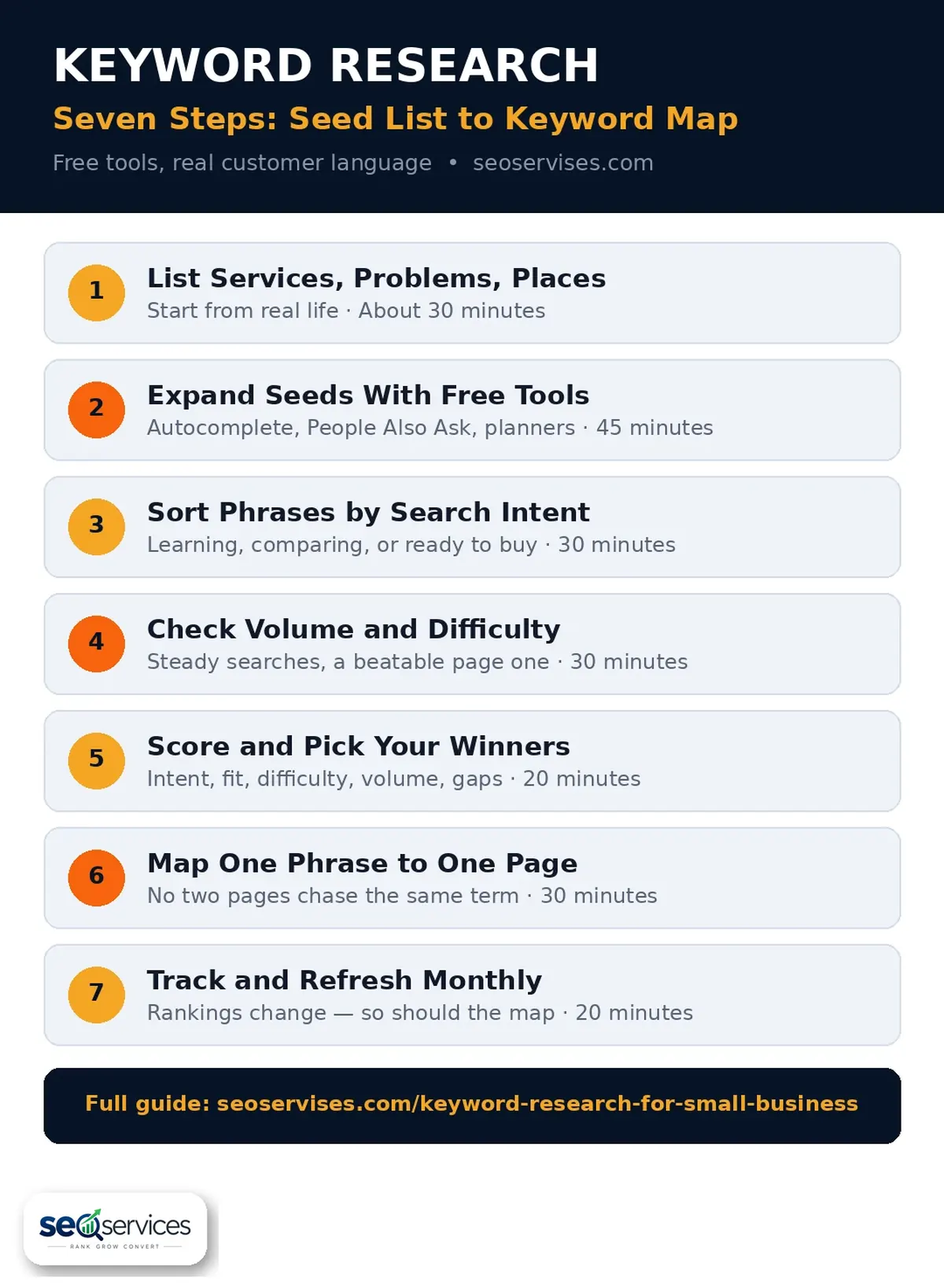
Table 1: The Seven Steps at a Glance
Work through the steps in this order. Each step feeds clean data into the next one. Skipping steps creates messy lists and weak pages.
| Step | Main action | Time needed |
|---|---|---|
| 1 | List services, problems, and places | 30 minutes |
| 2 | Expand seeds with free tools | 45 minutes |
| 3 | Sort phrases by search intent | 30 minutes |
| 4 | Check volume and difficulty | 30 minutes |
| 5 | Score and pick your winners | 20 minutes |
| 6 | Map one phrase per page | 30 minutes |
| 7 | Track and refresh monthly | 20 minutes |
Step 1: Build Your Seed List From Real Life
Start away from tools, with your own business. Write down every service you sell. Add every product group you stock. Then add the problems those offers solve.
Talk to the people who hear customers daily. Front desk staff know the exact phrases. Sales staff know the objections and comparisons. Support staff know the repeat pain points.
Read your reviews for customer wording too. Happy customers describe outcomes in plain words. Those words often match real search phrases closely. Copy useful phrases into your notes verbatim.
Add your service areas to the list. City and neighborhood names create local phrases. A roofer in Denver serves many suburbs. Each suburb can support its own service page later.
Aim for fifteen to thirty seed phrases. Seeds are starting points, not final targets. Step two will grow the list a lot. Keep the seed list in a simple spreadsheet.
Where do I find keyword ideas for my small business?
Start with customers, reviews, and your own inbox. Those sources use real buyer language every day. Then open Google and type each seed phrase slowly. Note the autocomplete suggestions that appear below. Read People Also Ask and related searches too. Add competitor service pages for extra ideas. Free sources beat any single paid tool here.
Step 2: Expand the List With Free Tools
Google autocomplete is your fastest expansion tool. Type a seed phrase and pause before pressing enter. Save every suggestion that fits your offer. Repeat with letters added at the end.
People Also Ask gives you question phrases. Those questions make strong blog topics and FAQ sections. Related searches at the page bottom add more. Work through two or three seed phrases per session.
Google Keyword Planner adds volume ranges for free. It needs a Google Ads account, not ad spend. Treat its ranges as rough guides only. A range like 1K to 10K still signals demand.
Google Trends helps you compare two phrases. It shows which wording people use more often. It also reveals seasonal peaks for planning. A landscaper can time content before spring demand.
Search Console may be your best source already. Its Performance report lists queries you already rank for. Phrases sitting in positions five to fifteen are gold. Small improvements can move those pages fast.
AnswerThePublic and similar tools group question phrases. Their free tiers limit daily searches, so plan ahead. Save the full output into your spreadsheet. You will sort it in the next step.
Step 3: Sort Every Phrase by Search Intent
Intent tells you what page type should answer. Four intent groups cover most searches well. Informational searches want guides and clear answers. Commercial searches compare options before a choice.
Transactional searches aim to buy or book now. Local searches add a place or near me wording. Navigational searches look for one known brand. Most small sites can skip navigational phrases safely.
Check intent against the live results page. Search the phrase and study the top results. Guides ranking means informational intent rules there. Service pages ranking means buyers are ready.
Never fight the results page format. A blog post rarely wins a transactional search. A service page rarely wins a how-to search. Match your page type to the pattern.
This sorting step prevents most beginner mistakes. It also feeds your content calendar directly. Each intent group becomes a page type queue. Our on-page SEO checklist then guides each page build.
What is search intent and why does it matter?
Search intent is the goal behind a search phrase. One searcher wants steps, another wants prices. Google ranks pages that match that goal best. A great page with the wrong intent still loses. Sorting by intent puts the right page type forward. It also stops two pages chasing one goal. Check the live results to confirm each call.
Step 4: Check Volume and Difficulty With Care
Volume tells you how often people search. It does not tell you what a click is worth. Ten buyer searches can beat a thousand casual ones. Always read volume beside intent and fit.
Difficulty scores estimate how hard ranking will be. Free tools show rough scores or none at all. Your own results page review matters more. Look at who ranks on page one today.
Small local sites ranking means real opportunity. Huge national brands ranking means a harder fight. Look for weak titles and thin content too. Those gaps signal a winnable phrase.
Long-tail phrases deserve special attention here. They run three or more words long usually. They bring lower volume but clearer intent. New sites often rank for them within months.
A Denver plumber shows the pattern clearly. The phrase plumber denver is broad and brutal. The phrase water heater repair denver is narrower. It also describes a paying job directly.

Table 2: A Simple Scoring Model You Can Copy
Score each phrase from one to five per factor. Add the scores and sort the sheet. Work the highest totals first each month.
| Factor | Score 1 looks like | Score 5 looks like |
|---|---|---|
| Buyer intent | General learning phrase | Ready to book or buy |
| Business fit | Side topic for your offer | Core service you sell daily |
| Difficulty | National brands fill page one | Local sites with thin pages |
| Volume | Almost no searches found | Steady searches every month |
| Page gap | Strong page already exists | No page covers it yet |
Step 5: Pick Winners and Cut the Rest
Your expanded list may hold hundreds of phrases. A small team cannot chase them all. Scoring turns the pile into a short queue. Pick ten to twenty phrases for this quarter.
Put service phrases at the top of the queue. They sit closest to revenue for most businesses. Add local variants for each core service. Then add question phrases that support those services.
Cut phrases you cannot serve honestly. A phrase about a service you dropped helps nobody. A phrase for a city you never visit wastes effort. Honest cuts keep the map clean and focused.
Keep the cut phrases in a parking tab. Demand and offers change over time. A parked phrase may fit next year. Review the parking tab each quarter briefly.
How many keywords should a small business target?
Start with ten to twenty phrases per quarter. That pace suits a small team writing weekly. Each phrase needs one strong page behind it. Thin pages for fifty phrases will fail together. Depth beats spread at this scale every time. Add more phrases after the first group ranks. Growth then funds the next research round.
Step 6: Map One Phrase to One Page
Mapping assigns each winner to a single page. Write the phrase, page URL, and intent together. Add a column for page status as well. This sheet becomes your keyword map.
One page can cover close phrase variants. Water heater repair and water heater repairs belong together. They share intent, wording, and page content. Grouping variants keeps pages strong and focused.
Two pages must never chase one phrase. That split is called cannibalization in SEO. It forces Google to pick between your pages. Both pages usually rank worse as a result.
Our full guide on keyword cannibalization and its fixes explains that problem deeply. Read it before you merge or split pages. The fix is simple once you see the map.
Check the map before every new post. Five minutes of checking prevents months of cleanup. The map also guides your internal links later. Related pages link to each other with clear anchors.
Can I do keyword research without paid tools?
Yes, free tools cover the full process well. Google suggestions show real searcher wording daily. Keyword Planner adds rough volume ranges for planning. Search Console reveals phrases you already rank for. Trends compares wording and seasonal demand clearly. Paid tools mainly save time at larger scale. Start free, publish, and upgrade only when volume grows.
Step 7: Track Results and Refresh the Map
Research is not a one-time project. Search Console shows new queries every month. Some queries will surprise you completely. Add the good surprises to your map.
Review positions for your mapped phrases monthly. Pages stuck below position ten need attention. Improve the content or internal links first. Sometimes a better title alone lifts clicks.
Refresh older pages with new customer questions. Questions change as products and prices change. A yearly refresh keeps top pages earning. Note each refresh date in your map.
Google covers the wider basics in its SEO starter guide for site owners.
Drop phrases that brought no value after a fair test. Replace them with phrases from your parking tab. The map stays small, current, and useful. That discipline compounds over many months.
If the process still eats too much time, get help. Our team builds keyword maps inside our on-page SEO services for growing businesses. We hand over the map, not just a report.

A Worked Example: A Small Bakery in Ohio
Maria runs a bakery in Columbus, Ohio. Her seed list starts with wedding cakes and birthdays. Reviews praise her gluten-free options often. She adds gluten-free phrases to the seed list.
Autocomplete expands wedding cakes columbus quickly. She finds custom wedding cake tasting columbus too. People Also Ask adds questions about cake prices. Those questions become a helpful pricing guide post.
Her map assigns one phrase per page. The service page targets wedding cakes columbus. The blog targets how much wedding cakes cost. A third page covers gluten-free birthday cakes.
Three months later, Search Console shows movement. The pricing guide earns clicks and quote requests. Maria now plans a tasting page next. Research turned her guesswork into a queue.
Ready to Build Your Keyword Map?
You now know a complete, free research process. Start with real customer words this week. Sort by intent, score honestly, and map carefully. Your next ten pages will have clear jobs.
Want the map built for you instead? Our team will research, score, and map your phrases. Contact us for a free first look at your site.
Frequently Asked Questions
What is the best free keyword research tool?
Google Search Console is the best free starting point. It shows phrases your site already ranks for. Keyword Planner adds volume ranges for new ideas. Autocomplete reveals exact wording that searchers use. Together, these free tools cover most small business needs. Paid tools help later, at bigger scale.
How long does keyword research take?
A first full session takes two to three hours. That covers seeds, expansion, sorting, and mapping. Later monthly reviews take about thirty minutes each. The time drops as your map matures. Rushing the first session creates messy data. Block one quiet morning and do it properly.
What is a good search volume for a small business keyword?
Local buyer phrases can pay off at fifty monthly searches. What matters is intent and fit, not raw size. A phrase that brings five ready buyers beats fluff. Check volume ranges inside Keyword Planner for context. Then weigh the phrase against your scoring model. Small, steady demand often suits small teams best.
How often should I redo keyword research?
Review your map monthly and rebuild it quarterly. Monthly reviews catch new Search Console queries early. Quarterly rebuilds catch shifts in offers and demand. Seasonal businesses should plan one season ahead. A landscaper researches spring phrases in winter. Steady reviews keep your calendar full and relevant.
Should I target keywords with zero search volume?
Sometimes, yes, when the phrase matches a real service. Tools miss many new and niche phrases entirely. Customers may still search them in small numbers. One clear page can own that phrase cheaply. Just balance zero-volume bets with proven demand. Keep most of your queue tied to known searches.



2 Comments