BLOG • WORDPRESS SEO
Best WordPress SEO Plugins in 2026: 7 Tools Tested and Compared
WordPress ships without most SEO controls built in. A plugin fills that gap for you. Picking the wrong one wastes money and time. Picking two at once can break your site.
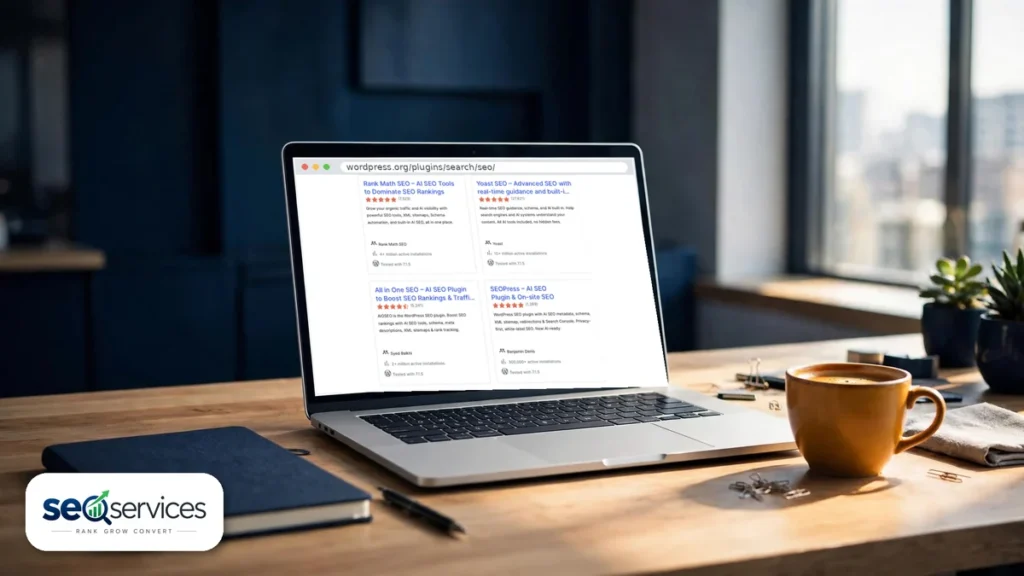
Table of Contents
This guide compares the best WordPress SEO plugins for buyers still shortlisting. It suits owners who have not narrowed the field yet. If two finalists remain, read a head-to-head instead.
We judged each plugin on free features first. We also checked schema, redirects, and ease of use. Prices got special care in this guide. First-year deals often hide higher renewal costs.
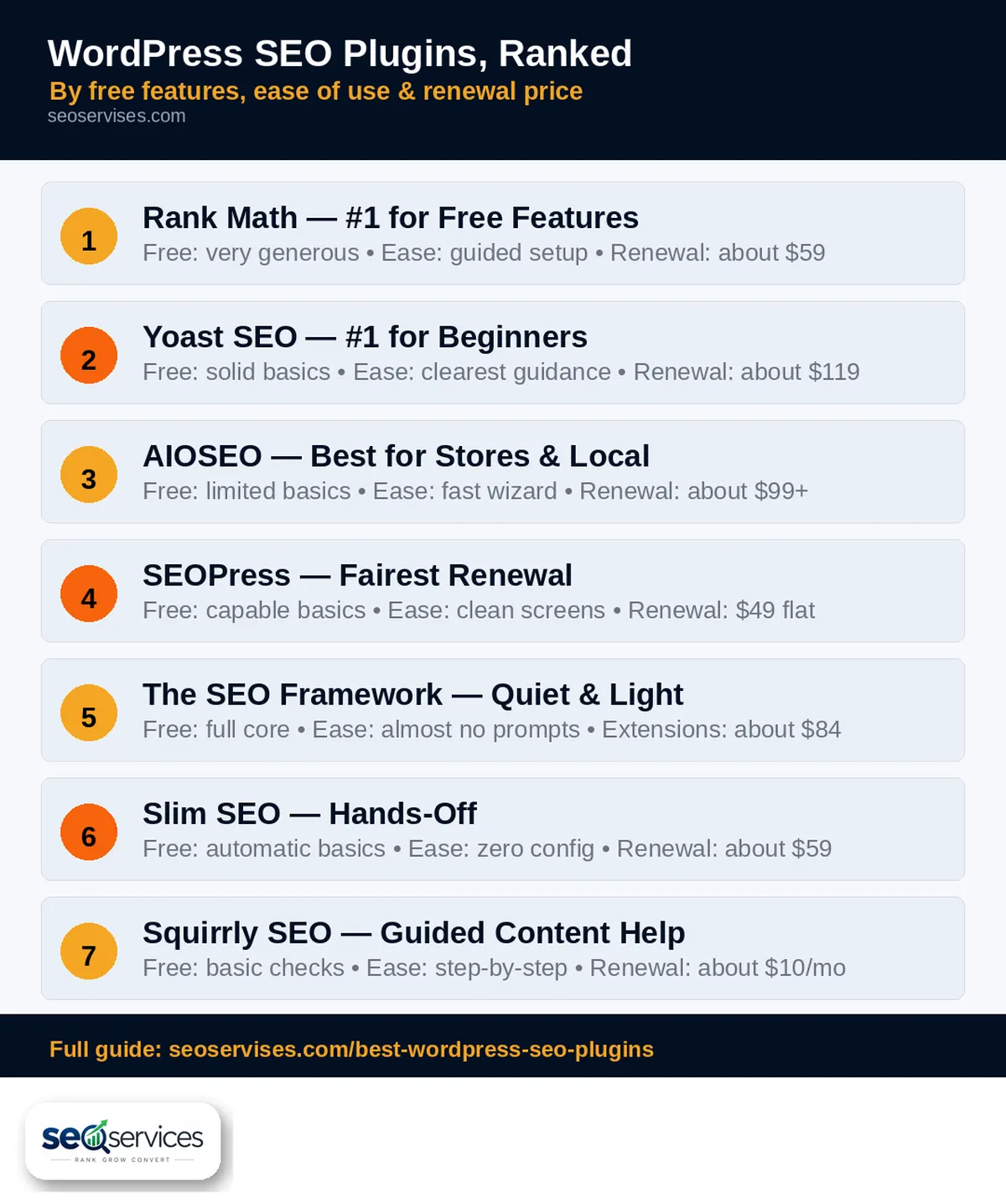
Quick answer: Most small sites should start with Rank Math free. Yoast suits beginners who want gentle guidance. AIOSEO fits stores and local firms well. SEOPress offers the fairest renewal price. Pay only when a paid feature solves a real problem.
The seven plugins at a glance:
- What an SEO plugin actually does
- How we compared the seven tools
- The seven plugins, one by one
- First-year price versus renewal price
- Why you must pick only one plugin
- Which plugin fits your type of site
- How to switch plugins safely
What an SEO Plugin Actually Does
A good plugin handles the dull technical jobs. It writes your XML sitemap for Google. It controls titles and meta descriptions per page. It adds canonical tags and basic schema. It also manages social sharing previews.
Most plugins add a content checker too. The checker scores each post as you write. It flags missing keywords and weak headings. Treat that score as a guide, not gospel.
No plugin writes content or earns links. No plugin fixes a slow or thin site. It handles settings while you handle substance. That split matters when you set a budget.
Do I even need an SEO plugin for WordPress?
Yes, for almost every business site. WordPress alone gives you no sitemap control. It gives no per-page title editing either. A free plugin covers those basics in minutes. Skipping one means hand-coding tags or going without. One free plugin is the simple, safe default.
How We Compared the Seven Tools
We used the same checks on every plugin. First, what does the free tier include? Second, how deep is the schema support? Third, are redirects built in or paid? Fourth, how fast can a beginner finish setup?
We checked active installs on WordPress.org too. Big install counts mean wide theme compatibility. They also mean answers are easy to find. The official Rank Math listing on WordPress.org shows one example.
Price checks came from each vendor site. We recorded the first-year price owners see first. We also recorded what renewal really costs. That second number is where guides stay quiet.
Table 1: The Seven Plugins at a Glance
| Plugin | Best for | Free tier | Paid plans start |
|---|---|---|---|
| Rank Math | Most features free | Very generous | About $59 per year |
| Yoast SEO | Beginners and bloggers | Solid basics | About $119 per year |
| AIOSEO | Stores and local firms | Limited basics | About $99 per year |
| SEOPress | Agencies and many sites | Capable basics | $49 per year |
| The SEO Framework | Light, quiet setups | Full core features | About $84 per year |
| Slim SEO | Hands-off owners | Automatic basics | About $59 per year |
| Squirrly SEO | Guided content help | Basic checks | About $10 per month |
The Seven Plugins, One by One
Here are the best WordPress SEO plugins in shortlist order. Start at the top and stop when one fits.
Rank Math
Rank Math gives the most away for free. It tracks several focus keywords per post. Schema, redirects, and a 404 monitor cost nothing. Search Console data appears inside your dashboard. Beginners may find the screens busy at first. The easy setup mode hides advanced options well. Most small sites never need the paid tier.
Yoast SEO
Yoast is the oldest name in this list. Over ten million sites run it today. Its traffic-light checks teach as you write. Readability guidance is the clearest here. The free tier covers titles, sitemaps, and schema. Redirects and multiple keywords sit behind Premium. Choose Yoast for guidance and a huge support library.
All in One SEO
AIOSEO suits business sites and online stores. Its setup wizard scores your whole site fast. Local SEO and WooCommerce tools are strong. Video and news sitemaps come in paid tiers. The free tier feels more limited than rivals. Stores gain the most from its paid plans. Local firms with several services also fit well.
SEOPress
SEOPress keeps its screens clean and ad-free. It covers titles, sitemaps, schema, and redirects. The free tier allows unlimited keyword analysis. Pro covers unlimited sites on higher tiers. Its renewal price matches its first price. That honesty is rare in this market. Agencies managing many client sites rate it highly.
The SEO Framework
This plugin favors speed and quiet automation. It sets sensible defaults with almost no prompts. There are no ads or upsell banners. Schema and titles are handled automatically. Owners who hate settings screens like it most. Content scoring is lighter than Yoast or Rank Math. Developers and minimalists form its core fan base.
Slim SEO
Slim SEO aims for zero configuration work. Install it and most settings handle themselves. Meta tags, sitemaps, and schema run automatically. It stays very light on your server. There is no content analysis panel at all. Owners who never touch settings sleep well. Bloggers wanting guidance should pick another tool.
Squirrly SEO
Squirrly guides non-specialists step by step. It gives weekly tasks and simple progress lists. Keyword research tools sit inside the plugin. Its style suits owners learning SEO alone. The interface feels different from WordPress norms. Pricing runs monthly, which adds up over years. Treat it as coaching software, not just settings.
Table 2: First-Year Price Versus Renewal Price
Intro deals are not the price you keep. This table shows what year two really costs. Prices change often, so confirm before you buy.
| Plugin | First year | Renewal year | Watch out for |
|---|---|---|---|
| Rank Math Pro | About $59 | Standard rate applies | Discounted first term ends |
| Yoast Premium | About $119 | About $119 | Price rose in recent years |
| AIOSEO | Often about $50 | About $99 or more | Half-price intro deals are common |
| SEOPress Pro | $49 | $49 | Renewal matches the first price |
| The SEO Framework | Free core | Extensions about $84 | Paid parts are optional add-ons |
| Slim SEO Pro | About $59 | About $59 | Higher tiers cover more sites |
| Squirrly SEO | About $120 | About $120 | Monthly billing hides yearly total |
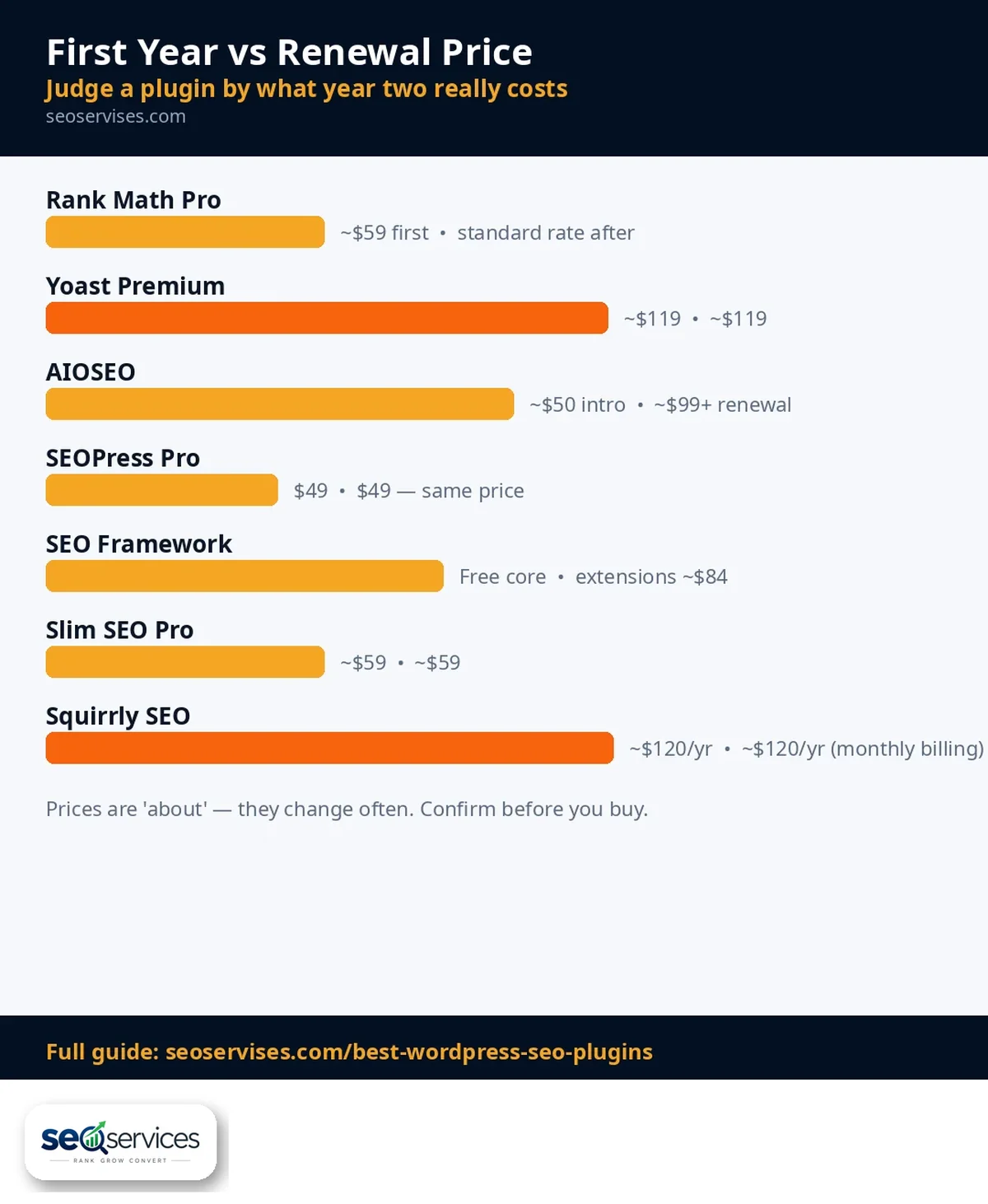
The lesson is simple and worth repeating. Judge a plugin by its renewal price. A cheap first year can double later. SEOPress stands out for keeping one price. AIOSEO deals need the most care at checkout.
Do I need to pay for a premium SEO plugin?
No, not when your site is starting out. Free tiers cover titles, sitemaps, and schema well. Pay when you need redirects or local tools. Pay when one site becomes a busy store. Many strong sites run free plugins for years. Upgrade for a named feature, never from habit.
Why You Must Pick Only One Plugin
Two SEO plugins fight over the same output. Both try to write your title tags. Both build sitemaps and canonical tags too. Search engines then see mixed, conflicting signals.
Can I run two SEO plugins at the same time?
No, never run two full SEO plugins together. They duplicate meta tags and schema output. They can also break sitemaps and redirects. Pick one plugin and commit to it. Single-purpose tools, like a caching plugin, are fine. They do a different job and cause no clash.
Specialist add-ons are a different case entirely. A schema-only or redirect-only tool can coexist carefully. Even then, check that outputs never overlap. One owner for each setting is the rule. Our WordPress SEO checklist shows which settings matter most.
Which Plugin Fits Your Type of Site?
The best WordPress SEO plugins differ mainly in workflow. Begin with yours. Beginners should start where guidance is clearest. Yoast teaches good habits while you publish. Slim SEO suits owners who want silence. Rank Math suits owners ready to learn more.
Local firms need reviews, maps, and service schema. AIOSEO and Rank Math both handle local needs. Stores need product schema and clean category controls. AIOSEO earns its price fastest for WooCommerce shops.
Agencies should weigh renewal cost across many sites. SEOPress Pro pricing stays flat and predictable. The SEO Framework suits fast, quiet client builds. Match the plugin to your weekly workflow, not hype.
Which SEO plugin is best for a beginner?
Yoast is the safest first plugin for beginners. Its checks explain each fix in plain words. Setup takes minutes with its guided wizard. Rank Math free is the close second choice. Pick it if you want more free features. Either beats running no plugin at all.
How to Switch Plugins Safely
Switching is safe when you follow the import path. Every major plugin imports rival settings automatically. Install the new plugin and run its importer. Check your homepage title and sitemap after.
Never overlap both plugins while you test. Activate the new one, then remove the old. Spot-check five key pages for titles and descriptions. Confirm your sitemap still lists in Search Console.
A switch is also a good cleanup moment. Drop settings and add-ons you never use. Keep your URL structure exactly as it is. Our guide to WordPress permalink structure for SEO explains why URLs should stay put.
Will switching SEO plugins hurt my rankings?
Not if you migrate your settings with care. Use the built-in importer every major plugin offers. Then recheck titles, canonicals, and your sitemap. Rankings hold when the output stays the same. Problems come from skipped checks, not the switch. Give the change one careful hour.
When a Plugin Is Not Enough
A plugin handles settings, not strategy or content. It cannot choose keywords or write service pages. It cannot earn links or fix weak offers. Those jobs decide whether the settings matter.
Many owners install a plugin and stop there. Rankings then stall despite perfect green lights. The missing work is content, links, and local proof. That work takes steady hours each month.
Our WordPress SEO services cover that full workload for owners. We set up the plugin as one early step. Then we build the pages and links behind it.
Ready to Pick the Right Plugin Once?
Start free, pick one of the best WordPress SEO plugins, and set it up well. That simple plan beats most paid stacks. Renewal price matters more than any launch deal. Your content and links will do the rest.
Want help choosing and configuring your plugin? Contact us for a plain review of your site. Tell us your platform and your main goal.
Frequently Asked Questions
What is the best free SEO plugin for WordPress?
Rank Math free leads on features for most sites. It includes schema, redirects, and several focus keywords. Yoast free is gentler for brand-new bloggers. The SEO Framework free never nags or upsells. All three cover titles and sitemaps fully. Pick by workflow, since output quality is close.
Is Rank Math better than Yoast SEO?
Each wins for a different kind of owner. Rank Math gives more features away free. Yoast gives clearer guidance and a longer record. Our full Rank Math vs Yoast comparison tests both in depth. Read it when these two are your finalists. For a wider field, this list comes first.
Can an SEO plugin guarantee higher rankings?
No plugin can promise rankings to anyone. Plugins control settings, tags, and sitemaps only. Rankings also depend on content, links, and rivals. A plugin removes technical friction from your site. Your pages still must deserve to rank. Treat any guarantee as a sales warning sign.
Which WordPress SEO plugin is best for WooCommerce?
AIOSEO and Rank Math lead for online stores. Both handle product schema and category settings well. AIOSEO adds strong store-focused checks and reports. Rank Math keeps more of that free. Yoast needs a paid add-on for stores. Choose by budget and how complex your catalog is.
How do I install an SEO plugin in WordPress?
Open Plugins, then Add New, in your dashboard. Search the plugin name and click Install Now. Activate it and run the setup wizard. Import settings if you switch from another plugin. Never activate a second SEO plugin during setup. The whole job takes about fifteen minutes.