BLOG • LOCAL SEO
How to Get More Google Reviews (Without Breaking the Rules)
Happy customers rarely review you without a prompt. They leave pleased, then life gets busy. One unhappy customer writes a long review alone. Without a system, your rating skews unfairly negative.

This guide builds a simple, legal review system. You will learn timing, links, scripts, and replies. You will also learn which shortcuts trigger penalties. The system supports our local growth services for small firms.
Quick answer: Learning how to get more google reviews starts with asking. Ask every customer right after a finished job. Send one direct review link or QR code. Reply to every review you receive. Never pay, reward, or filter your reviewers.
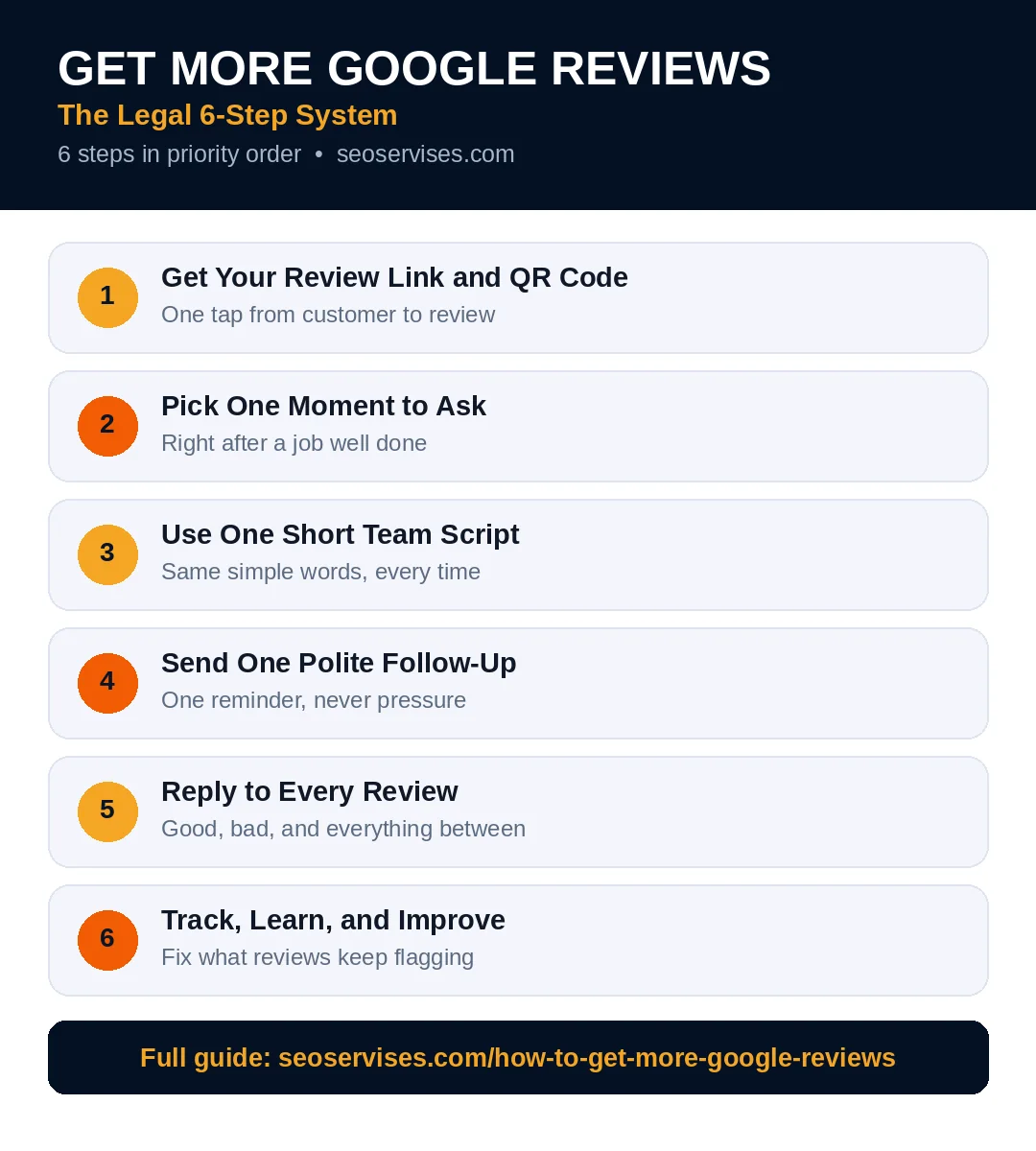
The system at a glance:
- Get your direct review link and QR code
- Pick one moment to ask every customer
- Use one short script for the whole team
- Send one polite follow-up message
- Reply to every review within two days
- Track counts against your closest rivals
Table 1: Legal Tactics vs Banned Shortcuts
The left column builds reviews that stay live. The right column risks removal and penalties.
| Legal and safe | Banned and risky |
|---|---|
| Ask every customer the same way | Ask only happy customers |
| Share a direct review link | Offer discounts for reviews |
| Print a QR code at checkout | Buy reviews from a seller |
| Send one follow-up reminder | Pay staff per review collected |
| Reply to all reviews calmly | Ask family to post reviews |
| Fix problems, then invite feedback | Hide unhappy customers from the link |
Step 1: Get Your Review Link and QR Code
Your profile holds a short review link. Open your dashboard and choose “Ask for reviews.” Google gives you a link and QR code. Save both in one shared team folder.
Shorten friction at every step for customers. A direct link opens the review form instantly. Asking shoppers to search your name fails. Most people quit after two extra taps.
Print the QR code where payment happens. Counters, invoices, and receipts all work well. Add the link to email signatures too. Put it on your website contact page. One link, used everywhere, keeps things simple.
Test the link on your own phone monthly. Sign out and tap it like a customer. Confirm the form opens for your business. Broken links silently kill your review flow.
How do I find my Google review link?
Open your Business Profile while signed in. Choose the “Ask for reviews” option inside. Google shows your short link and QR code. Copy the link into your messages and invoices. Test it monthly on a signed-out phone.
Step 2: Pick One Moment to Ask
Timing decides whether customers actually respond. The best moment follows a clear success. A finished repair, a served meal, a solved problem. Memory and goodwill peak right then.
Ask the same day for shops and restaurants. Ask within hours after home service jobs. Waiting a week cuts response rates sharply. Waiting a month kills them almost fully.
Build the ask into your normal workflow. Add it to the closing step of each job. Tie it to invoicing or final walkthroughs. A fixed trigger beats good intentions daily. Busy weeks then still produce new reviews.
Train every team member on the moment. One missed handoff loses that customer forever. Put the trigger on your job checklist. Review the habit in weekly team meetings.
Step 3: Use One Short Team Script
A shared script keeps requests polite and consistent. It also keeps every ask within policy. Write it once and print it for staff.
In person: “Thanks for choosing us today. Would you share your experience on Google? This link opens our review page directly.”
By text: “Hi Sam, thanks for your business today. Would you leave us a quick Google review? It helps neighbors find us: [your link]”
By email: “Thanks for working with our team. Honest Google reviews help other local families choose well. You can leave one here in under a minute: [your link]”
Notice what these scripts never promise. They offer no discount, gift, or prize. They never request five stars specifically. They ask for honest feedback from everyone. That honesty keeps your profile fully compliant.
What should I say when asking for a review?
Keep the request short, warm, and specific. Thank the customer for one real detail. Share the direct link in the same message. Ask for honest feedback, not five stars. End without any pressure or deadline.
Step 4: Send One Polite Follow-Up
Many customers mean to review you later. A single reminder catches those good intentions. Send it three days after the first ask. Keep the tone light and brief.
One follow-up is polite and effective. Two or more reminders feel like pressure. Pressure breaks trust and can breach policy. Stop after the single follow-up message.
Automate the follow-up if your tools allow. Booking and invoicing tools often send timed messages. Automation keeps timing steady on busy days. Check the message text every quarter for accuracy.
Exclude customers with unresolved open complaints. Solve their problem first through normal service channels. Then your standard system treats everyone equally again. Never sort customers by expected star rating.
How many follow-up messages should I send?
Send one follow-up message, and only one. Three days after service works well for most firms. Keep it shorter than your first request. Include the same direct review link again. Thank them again for their business. Then stop, whatever they decide to do.

Step 5: Reply to Every Review
Replies show shoppers that a real owner listens. Google also encourages owners to respond to reviews. Your replies influence future customers most strongly. They read replies before they read ratings.
Reply within two days, faster when possible. Thank the reviewer and name one detail. “Thanks, Maria, we loved fixing your heater fast.” Specific replies read as genuine and caring. Copy-paste replies read as lazy and fake.
Answer negative reviews with extra care. Thank the customer for the feedback first. Apologize briefly for the poor experience. Offer a phone call to make things right. Never argue details in public replies. Never share private customer information in replies.
Good replies can soften a bad rating. Future readers judge your attitude under pressure. A calm owner wins trust despite one star. Many shoppers choose businesses with thoughtful replies.
How should I respond to a negative Google review?
Reply within two days with a calm tone. Thank them and apologize for the experience. Avoid arguing facts in the public thread. Invite them to call you for a fix. A fair resolution sometimes earns an updated review.
Step 6: Track, Learn, and Improve
Reviews reveal patterns your team cannot see. Read them together once a month. Note repeated praise and repeated complaints. Praise shows what to protect and promote. Complaints show what to fix next month.
Track three numbers in a simple sheet. Count new reviews each month first. Record your average rating second. Note your reply rate third. Compare all three with close rivals quarterly.
Set a modest, steady monthly target. Eight to twelve reviews suits many small firms. Steady flow beats sudden bursts for Google too. Bursts can trigger spam filters and removals. Slow, real growth stays safe and durable.
Share wins with the whole team monthly. Read one great review aloud in meetings. Staff effort grows when results feel visible. That energy keeps the ask habit alive.
Make Asking Easy for Every Customer Type
Different customers respond to different channels best. Older customers often prefer email or printed cards. Younger customers usually answer texts within minutes. In-store shoppers respond well to counter QR codes. Match the channel to the customer in front of you.
Keep one rule across every channel you use. Every customer gets the same honest request. The words, link, and timing should stay consistent. Only the delivery channel changes between customer groups. That consistency protects you during any policy review.
Staff confidence decides whether the system survives. Role-play the ask during one team training session. Let each person practice the script out loud twice. Awkward first attempts belong in training, not with customers. Confident staff ask more often and more naturally.
Remove common blockers before they cost you reviews. Some customers lack a Google account today. Tell them any email address can create one free. Some customers fear public names on reviews. Explain that they control their display name settings. Answering fears calmly earns reviews competitors never get.
Should I ask for reviews in person or by message?
Both channels work when the timing is right. In-person asks suit counters, tables, and final walkthroughs. Messages suit delivered work and home service jobs. Many firms pair a verbal ask with a text. The message carries the link they need later.
What Google and the FTC Ban
Google bans incentives in its fake engagement policy. Payment, discounts, and free goods all count. The ban covers reviews of any star rating. It also covers paying to change negative reviews.
Review gating breaks the rules as well. Gating means screening customers before sending links. Sending only happy customers to Google is gating. Sending unhappy customers to private forms is gating. Google can remove reviews gained through gating.
Fake reviews break federal rules too. The FTC bans bought and invented reviews nationwide. Penalties can exceed fifty thousand dollars per violation. Staff and family reviews count as conflicts. Google removes insider reviews when it spots them. Read the official rules in Google Business Profile Help before you scale.
This review engine works best on a tuned profile. Finish your profile setup with our step-by-step guide first if needed. Then place review links across that profile journey. The full local checklist for owners shows where reviews fit overall.
Table 2: Your First Thirty Days
This starter plan builds the habit without overwhelm. Each week adds one simple layer only.
| Week | Focus | Goal |
|---|---|---|
| Week 1 | Get link and QR code | Tools ready |
| Week 2 | Ask at the set moment | Ten requests sent |
| Week 3 | Add one follow-up message | Five reviews earned |
| Week 4 | Reply to every review | Full reply rate |

Why Reviews Lift Your Map Rankings
Google ranks local results by relevance, distance, and prominence. Reviews feed prominence more than any other signal. Fresh reviews show an active, trusted business. Detailed reviews also mention services and neighborhoods. Those words help Google match future searches.
Ratings shape click choices inside the map pack. A 4.7 rating beats a 4.1 visually. Shoppers call the higher-rated firm first usually. More calls then reinforce your local strength. The cycle compounds when your system runs weekly.
Ready to Build Your Review Engine?
One link, one moment, and one script suffice. The system takes one afternoon to set up. It then runs inside your normal workday. Most firms see fresh reviews within two weeks.
Our team builds review systems into wider local campaigns. We set up links, scripts, tracking, and replies. Contact us for a free review system check.
Frequently Asked Questions
Can I offer a discount for a Google review?
No, Google bans all review incentives fully. Discounts, gifts, and prize entries all count. The ban applies even without a star request. The FTC also restricts paid positive reviews. Thank customers warmly, but offer nothing in return.
Can I ask only happy customers for reviews?
No, that practice is called review gating. Google bans screening customers by expected happiness. Send the same request to every customer. Honest mixed ratings look natural to shoppers. Gated profiles risk losing all their reviews.
How many Google reviews do I need?
No fixed number fits every local market. Aim to pass your closest rivals first. Then keep fresh reviews arriving each month. Recency matters as much as total count. Fifty stale reviews lose to twenty fresh ones.
Do Google reviews help my website ranking?
Reviews mainly lift your Maps and pack rankings. They support prominence, one key local factor. Website rankings gain only indirect help from reviews. Strong ratings still raise clicks and calls overall. Treat reviews as a local visibility tool first.
Can I remove a fake Google review?
Yes, you can report reviews that break policy. Use the flag option inside your dashboard. Google reviews reports and removes clear violations. Keep replying calmly while the report processes. Never pay anyone who promises review removal.
Is it okay to ask for reviews by text message?
Yes, texting your review link is allowed. Use numbers customers gave you for service. Keep messages short and easy to exit. Send during normal business hours only. Follow your local messaging consent rules too.