BLOG • ON-PAGE SEO
How to Write Meta Titles and Descriptions That Get Clicks
Your page can rank well and still get ignored. Searchers see your title and description first. They compare it with nine other results. Then they click the one that sounds most useful.

That small block of text decides your traffic. A clear title earns clicks at the same ranking. A vague title sends those clicks to competitors. This guide shows you a simple writing system.
You will learn clear length rules first. Then you will write titles and descriptions step by step. You will also learn why Google sometimes rewrites them. Better still, you will learn how to reduce those rewrites.
Quick answer: Learning how to write meta titles starts with search intent. Put the main keyword near the front. Keep titles near fifty to sixty characters. Keep descriptions near 150 to 160 characters. Make every title and description unique. Match the words to the page content. Then test click rates in Search Console.
What Your Title and Description Actually Do
Your title tag sets the clickable headline in results. Google calls that headline a title link. Your meta description often becomes the snippet below it. Together, they form your free search advert.
The title tag also helps Google understand your page. It carries real weight in rankings. The description works differently, as one question below explains. Its job is persuasion, not ranking.
Think about a plumber in Austin, Texas. His emergency page ranks fourth for a local search. A sharper title can win him more calls. He gains traffic without moving one position. That is the real prize here.
Table 1: Length and Format Rules at a Glance
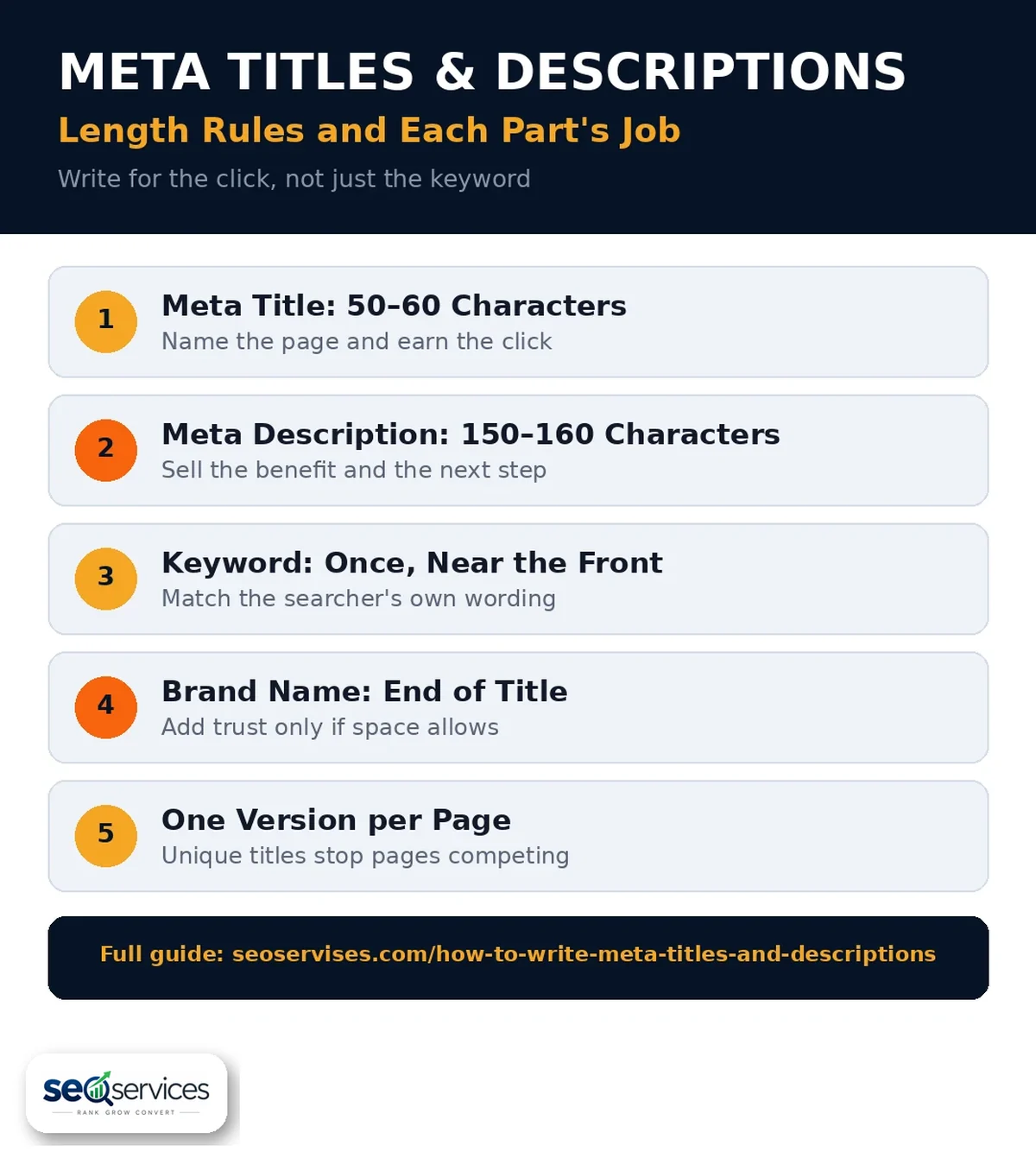
Use these ranges as working guides, not hard laws. Google measures display width in pixels, not characters. Wide letters take more space than narrow letters. Preview your text before you publish it.
| Element | Target length | Main job |
|---|---|---|
| Meta title | 50 to 60 characters | Name the page and earn the click |
| Meta description | 150 to 160 characters | Sell the benefit and next step |
| Brand name | End of title, if space allows | Add trust without crowding |
| Keyword | Once, near the front | Match the search wording |
| Uniqueness | One version per page | Stop pages competing with each other |
Step 1: Start With the Search Intent
Never write a title before you know the intent. Intent means the goal behind the search. A searcher may want to learn, compare, or buy. Your title must promise the right outcome.
Search your main keyword on Google first. Study the top ten results closely. Note whether guides, service pages, or products dominate. That mix tells you what Google expects.
Write down the exact words searchers use. Check the autocomplete suggestions under the search box. Read the People Also Ask questions too. Those phrases belong in your planning notes.
Then read your own page again. Your title must describe that page honestly. A title that overpromises will lose trust fast. It may also trigger a Google rewrite.
Pair this work with a full page review. Our on-page SEO checklist shows the wider checks in order. Titles work best inside that full routine.
Does a meta description affect rankings?
No, Google does not use descriptions as a ranking factor. Google has stated this clearly for years. The description still shapes your click-through rate strongly. More clicks from the same position mean more traffic. Matched query words also appear bold inside snippets. That bold text draws the searcher eye. So write descriptions for clicks, not for rankings.
Step 2: Write the Title With a Simple Formula
A reliable formula removes most guesswork. Use this order for most pages. Start with the main keyword phrase. Add one clear benefit or modifier. End with your brand name, if space allows.
A bakery example shows the pattern well. Weak title: Home | Smith Bakery | Best Bakery Ever. Strong title: Wedding Cakes in Dallas | Custom Designs | Smith Bakery. The strong version names the service and city. It adds a benefit that buyers care about.
Numbers often lift clicks on guide pages. Years, step counts, and prices add useful detail. Only use numbers your page actually delivers. Fake numbers damage trust and invite rewrites.
Question titles can work for question searches. They mirror the words the searcher typed. Use them only when the page answers fully. A question title on a sales page feels wrong.
Keep one main idea in each title. Two ideas split the message and waste space. Cut filler words like best and top unless earned. Specific words beat grand claims every time.
How long should a meta title be?
Aim for fifty to sixty characters on most pages. Google cuts titles by pixel width, not character count. So treat the range as a safe guide. Put the key words in the first forty characters. Mobile screens show even less text than desktops. Preview the title in a snippet tool. Shorten it if the main point gets cut.
Table 2: Weak Titles and Stronger Rewrites
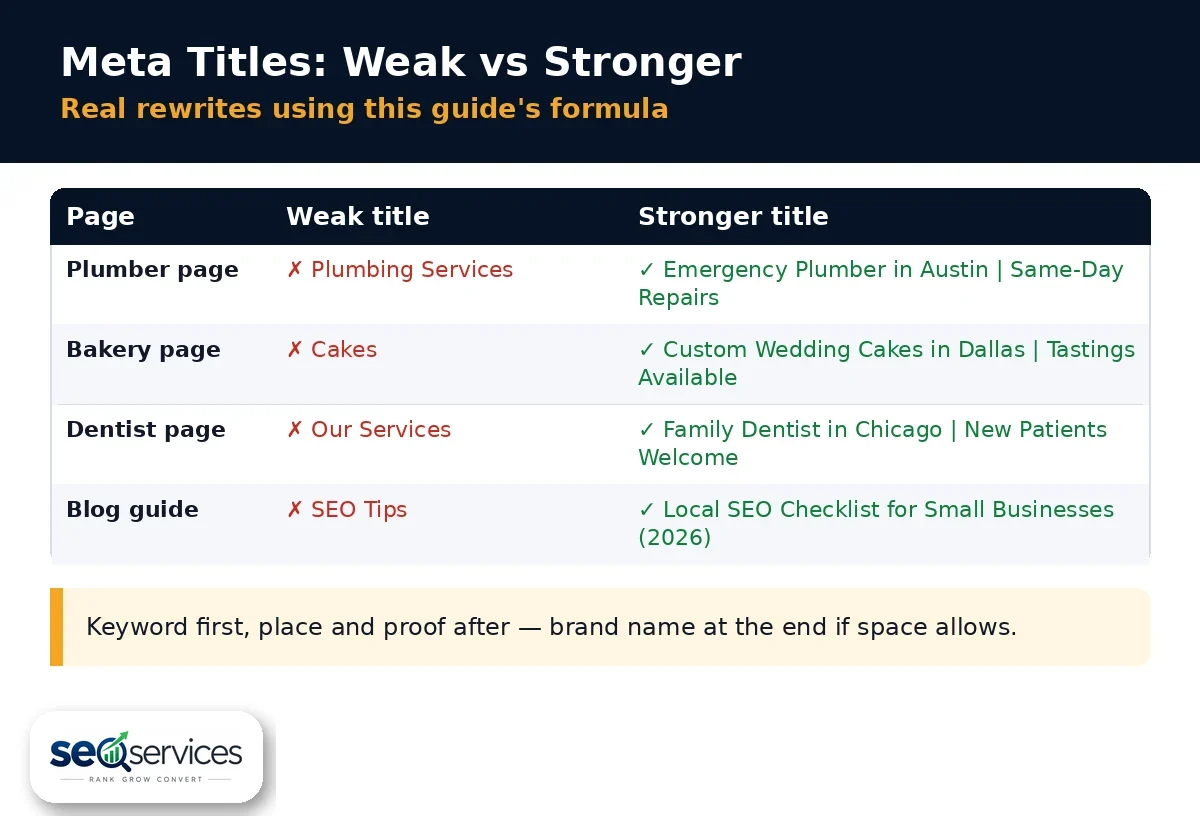
Study the pattern behind each fix below. The strong versions add intent, place, and proof. They also drop empty claims and filler.
| Page type | Weak title | Stronger title |
|---|---|---|
| Plumber service page | Plumbing Services | Emergency Plumber in Austin | Same-Day Repairs |
| Bakery product page | Cakes | Custom Wedding Cakes in Dallas | Tastings Available |
| Blog guide | SEO Tips | Local SEO Checklist for Small Businesses (2026) |
| Dentist service page | Our Services | Family Dentist in Chicago | New Patients Welcome |
| Shop category page | Shoes | Waterproof Trail Running Shoes | Free Returns |
Step 3: Write a Description That Sells the Click
Your description expands the promise from the title. Do not repeat the title words again. Add the detail a searcher needs next. Think of it as two short sales lines.
Start with the main benefit or outcome. Name the audience when that helps focus. Add one proof point or specific detail. Close with a soft call to action.
A dentist example shows all four parts. It reads: Gentle family dental care in Chicago. We offer Saturday hours, clear prices, and sedation options. Book your first visit online today. Every line gives a reason to click.
Use active verbs that start a clear action. Try learn, compare, book, get, or check. Keep each sentence short and easy to scan. Avoid stacking three adjectives in one line.
Include your main keyword once, naturally. Google may bold it in the snippet. That bolding helps your result stand out. Stuffing the keyword twice helps nobody here.
Write the description fresh for every page. Copied descriptions tell searchers nothing useful. Google often replaces copied text with page copy anyway. Unique text gives you control over the message.
Step 4: Handle Google Rewrites the Honest Way
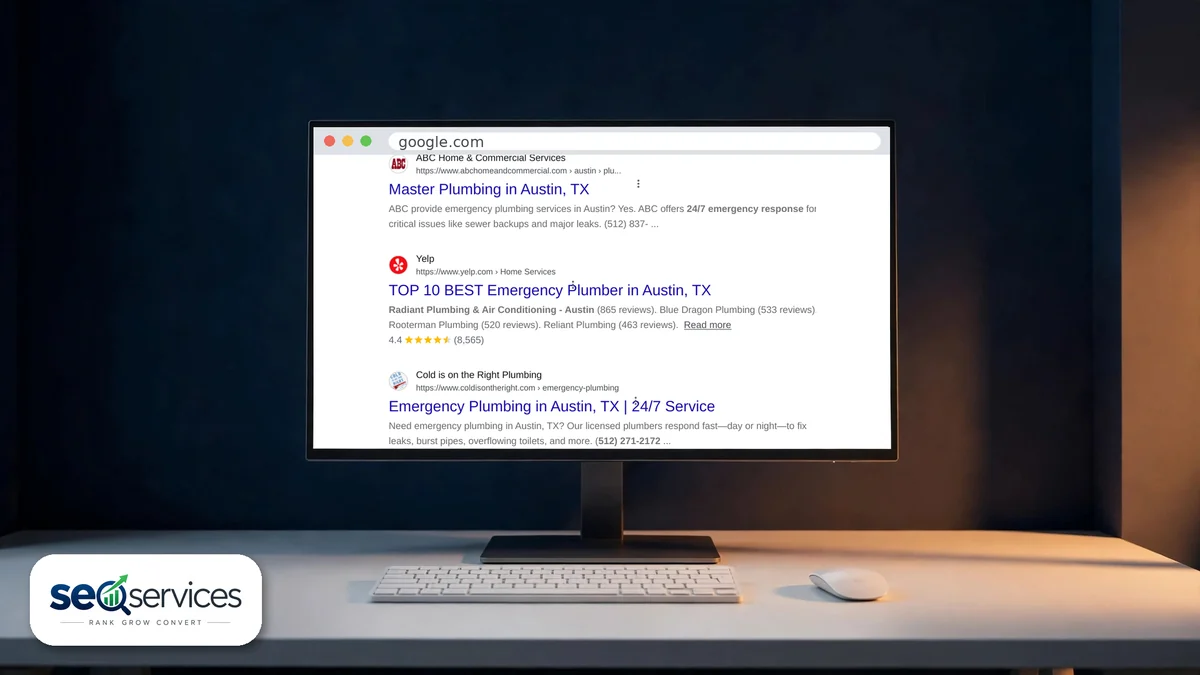
Google does not promise to show your exact text. Its systems build title links automatically. They use your title tag as one source. They also read your main heading and other prominent text.
Google gives this guidance in its title link documentation. The same team explains snippets in its snippet guidance. Read both pages before your next title audit.
Rewrites often follow a few clear patterns. Very long titles get replaced or trimmed. Stuffed titles full of keywords get replaced. Vague titles like Home or Profile get replaced. Titles that clash with the page heading get replaced.
Descriptions get rewritten even more often. Google picks page text that matches the query better. Different searches can show different snippets for one page. That behavior is normal, not a penalty.
You can lower the rewrite rate with simple habits. Match your title tag and H1 closely. Keep both accurate, short, and specific. Use one clear main heading per page. Avoid repeating your site name across every title.
Why does Google rewrite my title?
Google rewrites titles that mislead, repeat, or run too long. It may use your heading or anchor text instead. It picks text it judges clearer for that search. Check your title against the page content first. Fix clashes between the title and main heading. Most rewrites drop after those basic fixes. You cannot block rewrites, but you can reduce them.
Step 5: Add Brand, Place, and Proof With Care
Brand names help when searchers know your business. They waste space when nobody knows it yet. Put the brand at the end, after the topic. Skip it on tight blog titles.
Place names matter for local service pages. A city name matches how locals search. It also signals your service area fast. Add it when the page targets that city.
Proof words can lift clicks without hype. Examples include free quote, same-day, licensed, or family-owned. Each claim must be true on the page. Google and readers both punish empty claims.
Dates help guides that promise current advice. A year in the title signals fresh content. Update the page when you update the year. An old year on fresh content confuses everyone.
If titles still feel hard to get right, get a second pair of eyes. Our team handles this inside our on-page SEO services for small businesses. A short audit often finds quick click wins.
Should I add my brand name to every title?
No, add your brand only when it helps the click. Known brands add trust and recognition in results. Unknown brands add little and eat scarce space. Service pages and homepages usually suit a brand suffix. Blog guides often work better without one. Keep the brand short and consistent everywhere. Never repeat the brand twice in one title.
Step 6: Test, Measure, and Improve
Good titles are proven by data, not taste. Google Search Console shows clicks and impressions per page. It also shows the average click-through rate. Compare pages that share similar average positions.
Find pages with high impressions and low clicks. Those pages are your best rewrite targets. Change one element at a time there. Then wait at least two weeks before judging.
Note the old title and the change date. A simple spreadsheet keeps the test honest. Check results after Google recrawls the page. Some updates appear within a few days.
Pair each winning title with its matching keyword plan. Our guide to keyword research for local and small teams shows that planning step. Titles perform best when the keyword map is clear.
How long will it take to affect the changed meta title and description in Google search results?
Changes usually appear after Google recrawls the page. Busy pages may update within a few days. Quiet pages can take several weeks to refresh. You can request indexing in Search Console after editing. That request speeds discovery but guarantees nothing. Keep the new version live while you wait. Reverting early kills the test data.
Common Mistakes That Cost You Clicks
One mistake appears on almost every small site. Owners copy the same title across many pages. Google then struggles to tell pages apart. Searchers face the same problem in results.
Keyword stuffing is the second classic mistake. A title like Plumber, Plumbers, Plumbing Services looks desperate. Google may replace it with your heading text. Readers skip it for cleaner results.
Vague benefit words waste your best space. Words like quality and solutions say nothing specific. Swap them for services, places, prices, or timeframes. Specific detail is what earns the click.
Missing descriptions are a missed chance too. Google will build a snippet from page text. That snippet may stress the wrong detail. Write your own version and keep some control.
Old titles also drift away from page content. Pages change as offers and prices change. Titles should change at the same pace. Audit your top twenty pages every quarter.
A Simple Weekly Title Routine
Set aside thirty minutes each week for titles. Open Search Console and sort pages by impressions. Pick the page with the weakest click rate. Rewrite its title and description once.
Check the rewrite against this short list. Keyword near the front, in natural words. Length inside the target ranges from Table 1. One clear benefit and one honest proof point. Brand at the end, only if space allows.
Log the change in your tracking sheet. Move to the next page next week. Small steady fixes beat one frantic overhaul. Your top pages gain clicks month after month.
This routine suits owners with tiny teams. It needs no paid tools at all. Search Console and a spreadsheet cover the job. Consistency is the only real requirement here.
Ready to Win More Clicks From the Same Rankings?
You now have a clear system for titles and descriptions. Start with intent, then write, then test. Fix the pages that already earn impressions. Those rewrites deliver the fastest visible gains.
Want an expert eye on your top pages? Our team will review your titles, descriptions, and click data. Contact us for a free first review of your site.
Frequently Asked Questions
What is a meta title and meta description?
The meta title is the headline of your page in results. The meta description is the short summary below it. You set both inside the page HTML head section. SEO plugins add simple fields for both items. Google uses the title as a ranking signal. The description mainly drives clicks from searchers.
How long should a meta description be?
Aim for 150 to 160 characters on most pages. That range shows fully on most desktop results. Put the key benefit in the first 120 characters. Mobile results may show a shorter snippet anyway. Write a complete thought, even if it runs shorter. Padding a weak description adds no value.
Can I use the same title on several pages?
No, every page needs its own unique title. Duplicate titles confuse Google about page purpose. They also confuse searchers comparing your results. Similar pages still differ in service, place, or audience. Use those differences inside each title. Unique titles help every page stand alone.
What happens if my title is too long?
Google may trim it with an ellipsis on screen. It may also replace it with heading text. The cut often hides your benefit or brand. Shorten the title and front-load the key words. Preview the result before you save the change. A clean title survives most screen sizes.
How do I check the click-through rate for a page?
Open the Performance report in Google Search Console. Click the Pages tab to see page-level data. Compare clicks, impressions, and average click-through rate. Filter by a date range of at least 28 days. Pages with many impressions and low clicks need work. Rewrite those titles first for fastest gains.